[phpBB Debug] PHP Notice: in file /includes/bbcode.php on line 485: preg_replace(): The /e modifier is no longer supported, use preg_replace_callback instead
[phpBB Debug] PHP Notice: in file /includes/bbcode.php on line 485: preg_replace(): The /e modifier is no longer supported, use preg_replace_callback instead
[phpBB Debug] PHP Notice: in file /includes/bbcode.php on line 485: preg_replace(): The /e modifier is no longer supported, use preg_replace_callback instead
[phpBB Debug] PHP Notice: in file /includes/bbcode.php on line 485: preg_replace(): The /e modifier is no longer supported, use preg_replace_callback instead
[phpBB Debug] PHP Notice: in file /includes/bbcode.php on line 485: preg_replace(): The /e modifier is no longer supported, use preg_replace_callback instead
[phpBB Debug] PHP Notice: in file /includes/bbcode.php on line 485: preg_replace(): The /e modifier is no longer supported, use preg_replace_callback instead
[phpBB Debug] PHP Notice: in file /includes/bbcode.php on line 485: preg_replace(): The /e modifier is no longer supported, use preg_replace_callback instead
[phpBB Debug] PHP Notice: in file /includes/bbcode.php on line 485: preg_replace(): The /e modifier is no longer supported, use preg_replace_callback instead
[phpBB Debug] PHP Notice: in file /includes/bbcode.php on line 485: preg_replace(): The /e modifier is no longer supported, use preg_replace_callback instead
[phpBB Debug] PHP Notice: in file /includes/bbcode.php on line 485: preg_replace(): The /e modifier is no longer supported, use preg_replace_callback instead
[phpBB Debug] PHP Notice: in file /includes/bbcode.php on line 485: preg_replace(): The /e modifier is no longer supported, use preg_replace_callback instead
[phpBB Debug] PHP Notice: in file /includes/bbcode.php on line 485: preg_replace(): The /e modifier is no longer supported, use preg_replace_callback instead
[phpBB Debug] PHP Notice: in file /includes/bbcode.php on line 485: preg_replace(): The /e modifier is no longer supported, use preg_replace_callback instead
[phpBB Debug] PHP Notice: in file /includes/bbcode.php on line 485: preg_replace(): The /e modifier is no longer supported, use preg_replace_callback instead
[phpBB Debug] PHP Notice: in file /includes/bbcode.php on line 485: preg_replace(): The /e modifier is no longer supported, use preg_replace_callback instead
[phpBB Debug] PHP Notice: in file /includes/bbcode.php on line 485: preg_replace(): The /e modifier is no longer supported, use preg_replace_callback instead
[phpBB Debug] PHP Notice: in file /includes/bbcode.php on line 485: preg_replace(): The /e modifier is no longer supported, use preg_replace_callback instead
[phpBB Debug] PHP Notice: in file /includes/bbcode.php on line 485: preg_replace(): The /e modifier is no longer supported, use preg_replace_callback instead
[phpBB Debug] PHP Notice: in file /includes/bbcode.php on line 485: preg_replace(): The /e modifier is no longer supported, use preg_replace_callback instead
[phpBB Debug] PHP Notice: in file /includes/bbcode.php on line 485: preg_replace(): The /e modifier is no longer supported, use preg_replace_callback instead
[phpBB Debug] PHP Notice: in file /includes/bbcode.php on line 485: preg_replace(): The /e modifier is no longer supported, use preg_replace_callback instead
[phpBB Debug] PHP Notice: in file /includes/bbcode.php on line 485: preg_replace(): The /e modifier is no longer supported, use preg_replace_callback instead
[phpBB Debug] PHP Notice: in file /includes/bbcode.php on line 485: preg_replace(): The /e modifier is no longer supported, use preg_replace_callback instead
[phpBB Debug] PHP Notice: in file /includes/bbcode.php on line 485: preg_replace(): The /e modifier is no longer supported, use preg_replace_callback instead
[phpBB Debug] PHP Notice: in file /includes/bbcode.php on line 485: preg_replace(): The /e modifier is no longer supported, use preg_replace_callback instead
[phpBB Debug] PHP Notice: in file /includes/bbcode.php on line 485: preg_replace(): The /e modifier is no longer supported, use preg_replace_callback instead
[phpBB Debug] PHP Notice: in file /includes/functions.php on line 4245: Cannot modify header information - headers already sent by (output started at /includes/functions.php:3533)
[phpBB Debug] PHP Notice: in file /includes/functions.php on line 4247: Cannot modify header information - headers already sent by (output started at /includes/functions.php:3533)
[phpBB Debug] PHP Notice: in file /includes/functions.php on line 4248: Cannot modify header information - headers already sent by (output started at /includes/functions.php:3533)
[phpBB Debug] PHP Notice: in file /includes/functions.php on line 4249: Cannot modify header information - headers already sent by (output started at /includes/functions.php:3533)
แสดงกระทู้ - การใช้งานฟีเจอร์ VLAN บนเครื่อง Grandstream IP Phone • Moderator Control Panel • { UCP } • VoIP Community of Thailand - เว็บบอร์ด VoIP Issabel, Elastix Asterisk FreePBX IPPhone VoIP Gateway Call Center IPPBX ของไทย โดยคนไทย เพื่อคนไทย

การใช้งานฟีเจอร์ VLAN บนเครื่อง Grandstream IP Phone

Grandstream IP Phone, IP-PBX, VDO Phone, Camera

การใช้งานฟีเจอร์ VLAN บนเครื่อง Grandstream IP Phone

โพสต์โดย nuiz » 05 พ.ย. 2019 13:55

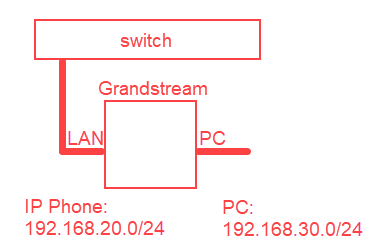
ผมมี Layer 2 Switch ตัวหนึ่งที่สามารถคอนฟิก VLAN ได้ทั้ง VLAN Access Mode และ VLAN Trunk Mode ผมจะเอาพอร์ต "LAN" ของ Grandstream IP Phone ต่อตรงกับ Port บน Switch และเอา PC ต่อกับพอร์ต "PC" ของ IP Phone อีกที โดยที่ IP ของ IP Phone และของ PC ให้รับจาก DHCP Server ทั้งคู่แต่อยู่คนละวงกันนะครับ ตามรูปนี้ครับ
ให้ IP Phone อยู่วง 192.168.20.0/24 และ PC อยู่วง 192.168.30.0/24 รับ IP จาก DHCP Server
การใช้งานฟีเจอร์ VLAN บนเครื่อง Grandstream IP Phone

คอนฟิกลักษณะนี้นะครับ เราต้องคอนฟิก LAN Port ของ Grandstream IP Phone ให้ทำงานเป็น VLAN Trunk Mode มีการกำหนดค่า VLAN ID ให้ด้วยซึ่งต้องตรงกับ VLAN ID ที่คอนฟิกบน Switch ดังรายละเอียดต่อไปนี้ครับ


หาได้ 3 วิธีครับ ได้แก่
1. ส่ง LLDP ออกไป ใครตอบมาก็น่าจะมีค่า VLAN ID มาด้วย เอาค่านั้นแหล่ะมาใช้งาน
2. รับมาจาก DHCP Option 132, 133 เรียกเต็มๆว่า DHCP VLAN Option ครับ
3. เราคอนฟิกบนหน้าเว็บ เรียกว่าการคอนฟิกแบบ Manual ครับ

บทความนี้ผมจะแสดงเฉพาะวิธีการคอนฟิก VLAN บน Grandstream IP Phone แบบ Manual เท่านั้นนะครับ และก็ไม่ได้แสดงวิธีการคอนฟิก VLAN บน Switch ด้วย เพราะการคอนฟิก VLAN บนสวิตซ์แต่ละยี่ห้อก็แล้วแต่ยี่ห้อนั้นๆครับ แต่สำหรับท่านที่ใช้ Mikrotik ผมมีบทความพิเศษให้ครับ


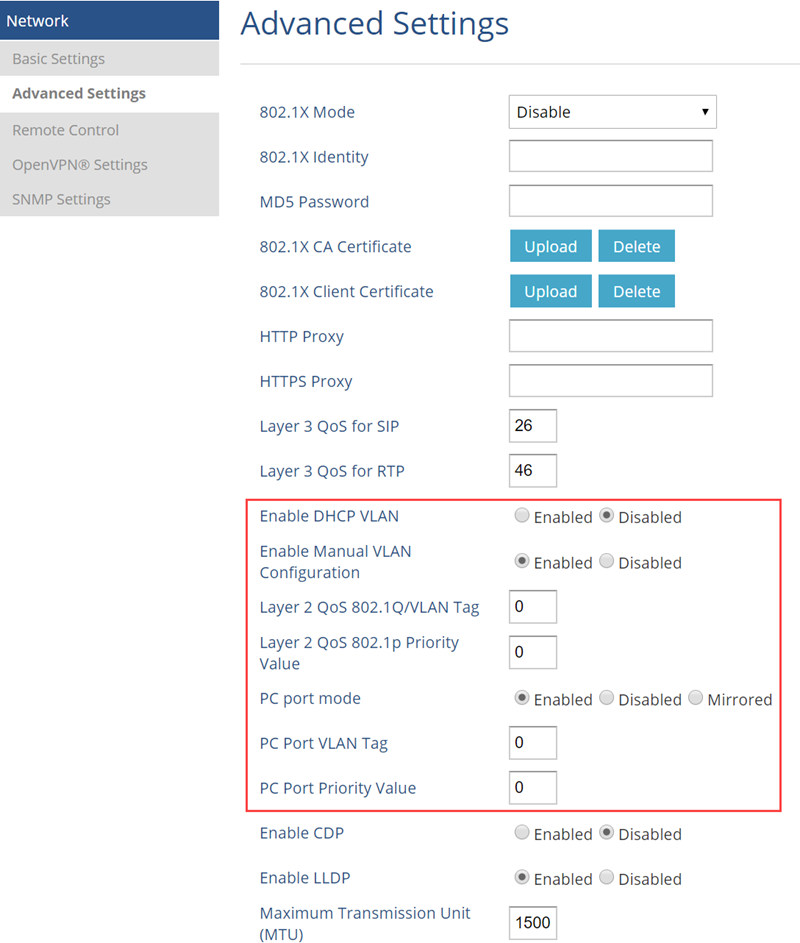
เมนูคอนฟิก VLAN บน Grandstream IP Phone อยู่หน้านี้ครับ NETWORK > Advanced Settings
การใช้งานฟีเจอร์ VLAN บนเครื่อง Grandstream IP Phone


Enable DHCP VLAN - จะรับคอนฟิก VLAN จาก DHCP Server (VLAN DHCP Option 132, 133) เราจะไม่ใช้ออปชั่นนี้ครับ ปล่อยไว้ Disabled เหมือนเดิมก่อน
Enable Manual VLAN Configuration - เราจะคอนฟิกแบบ Manual ก่อนครับ เลือก Enabled
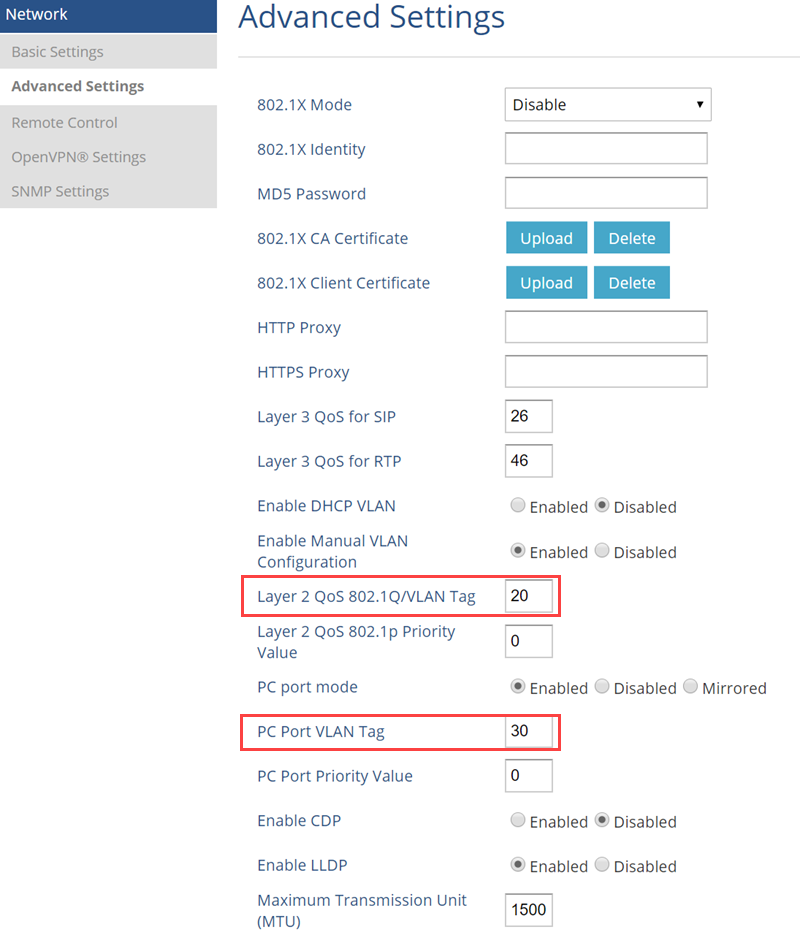
Layer 2 QoS 802.1Q/VLAN Tag - ใส่ค่า VLAN ID ครับ เช่น 20 ใส่ให้ตรงกับที่คอนฟิกไว้บน Switch นะครับ
Layer 2 QoS 802.1p Priority Value - ค่า Priority ครับ ใส่เป็น 0 ก่อน
PC Port mode - เลือกว่าจะให้พอร์ต PC ทำหน้าที่เป็นอะไร เช่น Enabled คือเอา PC มาต่อใช้งานปกติ
PC Port VLAN Tag - ใส่ค่า VLAN ID ครับ เช่น 30 ใส่ให้ตรงกับที่คอนฟิกไว้บน Switch นะครับ
PC Port Priority Value - ค่า Priority ครับ ใส่เป็น 0 ก่อน

ก็จะได้คอนฟิกประมาณรูปนี้ครับ
การใช้งานฟีเจอร์ VLAN บนเครื่อง Grandstream IP Phone


1. เชื่อมต่อสายแลนจาก Switch มายังพอร์ต LAN ของ Grandstream IP Phone และคอนฟิก IP Phone ให้รับ IP จาก DHCP Server ไอพีของไอพีโฟนเป็นตามรูปนี้ครับ ได้ไอพีวง 192.168.20.0/24 อย่างที่ต้องการเลย
การใช้งานฟีเจอร์ VLAN บนเครื่อง Grandstream IP Phone

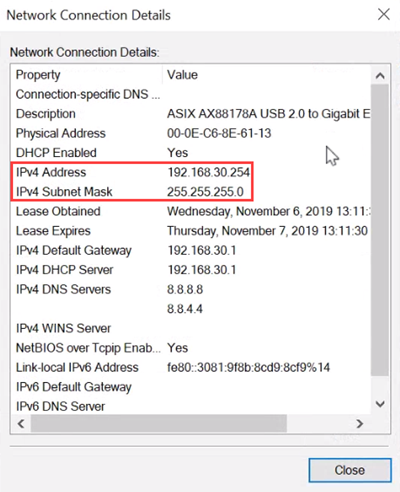
2. เชื่อมต่อสายแลนจาก PC มายังพอร์ต PC ของ Grandstream และคอนฟิก PC ให้รับ IP จาก DHCP Server ได้ไอพีวง 192.168.30.0/24 อย่างที่ต้องการ
การใช้งานฟีเจอร์ VLAN บนเครื่อง Grandstream IP Phone


จากที่ผมลองทดสอบพบว่าใช้งานได้ดีครับ แต่มีเทคนิคนิดนึงคือ (ผมเจอเองนะครับ บางท่านอาจจะไม่เจอ) เฟิร์มแวร์ 1.0.4.128 ถ้าผมเปลี่ยนค่า VLAN ID บน Grandstream ต้อง Reboot เครื่องครับ ไม่งั้นมันจำค่า VLAN ID เดิม


nuiz
Diamond Member
 
โพสต์: 7587
ลงทะเบียนเมื่อ: 24 มี.ค. 2010 09:33

ย้อนกลับไปยัง Grandstream - Connecting The World

ผู้ใช้งานขณะนี้

กำลังดูบอร์ดนี้: ไม่มีสมาชิกใหม่ และ บุคคลทั่วไป 1 ท่าน

cron